From AI Coding to a Merged PR: How I Run an Issue-Driven Agent Team
General Motors’ autonomous-driving division recently published a set of numbers: after redesigning its engineering workflow and embedding AI agents into daily work, merged PRs tripled. Before that, engineers spent only 15% of their time actually writing code. In other words, the whole team was spending most of its time not coding, but context-switching, waiting on CI, hunting down reviewers, and confirming “will this change break something else.”
That actually matches my own experience right now — I spend far more time communicating and reviewing than coding. In three earlier posts I walked through my entire development workflow. This post explains the issue-driven workflow I use now that the project has matured.
First, be clear about “automation”: it doesn’t write code for you, it runs a full engineer’s loop
I’ve stressed many times: the core value of an agent is not “writing,” but “running the loop to completion.”
When a software engineer picks up a ticket, the real workflow includes at least:
- Read the task: understand the issue description, business context, and acceptance criteria.
- Gather context: grep the code, read docs, dig through historical PRs.
- Plan: break it into steps, decide which files to change, what tests to write first.
- Write + test: code, run lint, run unit tests, debug.
- Open a PR: write a clear change summary, link the issue, push the branch.
- Respond to review: the reviewer leaves comments, you rework.
- Merge: a human gates it and merges into main.
The agent solves step 4, “writing.” An AI coding agent team solves the entire chain from 1 to 5, and turns step 6 into an asynchronous loop of “you send it back, it reworks.”
Part Two: how a ticket becomes a PR
I’ve drawn this chain as a diagram. Think of it as a “mini engineering pipeline” where every node has a clear deliverable, not a black box.
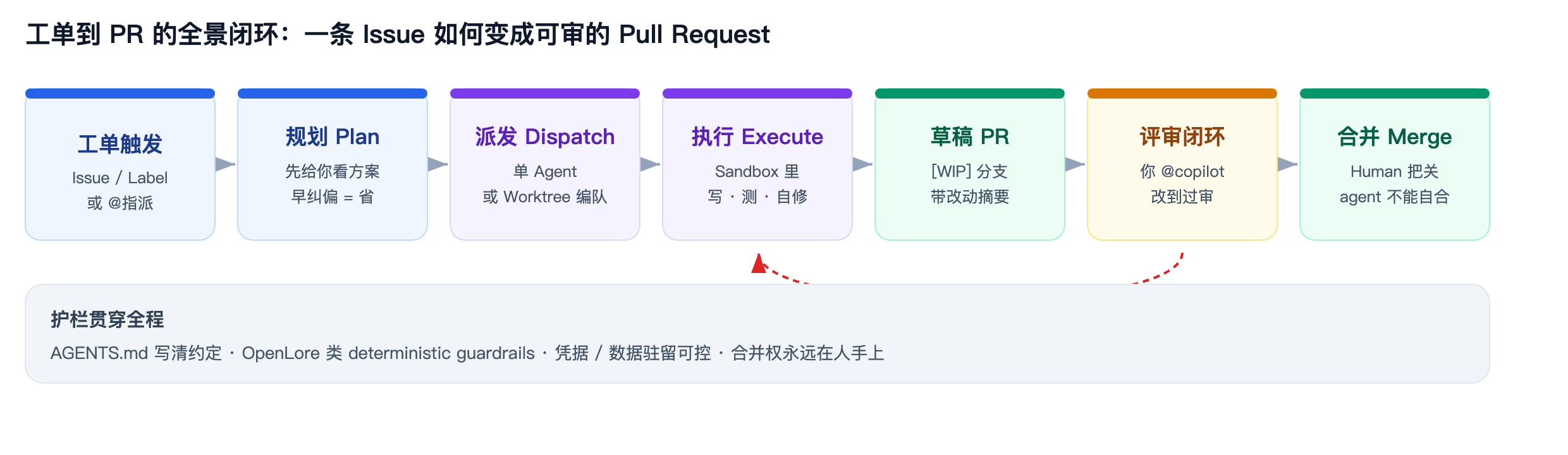
The seven nodes divide the work like this:
| Node | What the agent does | What the human does | Key deliverable |
|---|---|---|---|
| Ticket trigger | Watch issues, labels, @mentions | Write a clear issue / AGENTS.md | An acceptable task description |
| Plan | Propose an execution plan before writing code | Review the plan, course-correct | An approved plan |
| Dispatch | Decide single-agent vs. worktree fleet | Set strategy, allocate resources | A task entered into the sandbox |
| Execute | grep, read code, write, test, self-fix | Occasionally pulled in to read logs | A change that passes local tests |
| Draft PR | Push a [WIP] branch, write the summary | Get notified | A diffable PR |
| Review loop | Read review comments, rework | Send back, @copilot to iterate | A PR that passes review |
| Merge | Cannot self-merge | Human gates, then merges | A change into main |
Two key design points:
- Plan node comes first: show the human the plan before execution. Move the cheapest “course-correction” moment earlier, instead of discovering the direction was wrong after 40 files changed.
- The review loop can be sent back: the agent isn’t a one-shot. You comment on the PR “@copilot you used the wrong field here,” and it returns to the execute node and reruns until you approve.
Part Three: from “one agent” to “a team” — why roles should be separated
If a single agent runs all seven nodes above, it’s already strong. But what makes it approach “a team” is splitting the roles apart.
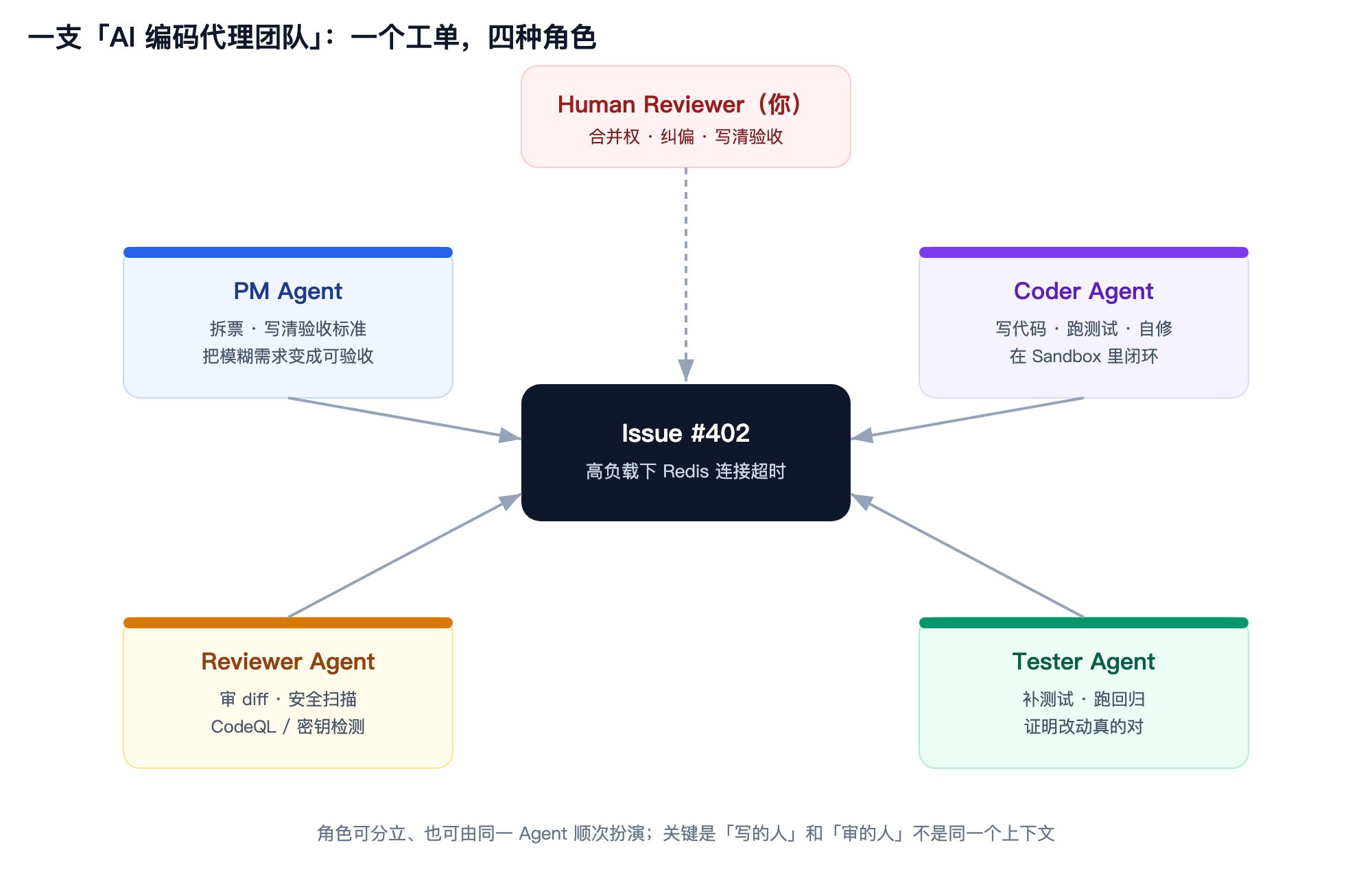
These four roles don’t require four processes. The same agent can play them in sequence, or they can be split into independent agents. I reuse the agents I described in my earlier posts:
- PM Agent: breaks vague requirements into acceptable subtasks. The clearer the ticket, the lower the chance of failure later.
- Coder Agent: actually writes code, runs tests, and self-fixes bugs in the sandbox.
- Reviewer Agent: specifically reviews diffs, runs security scans, checks naming conventions and side effects.
- Tester Agent: adds tests, runs regressions, proves “this change is actually correct.”
The key point: the person who writes and the person who reviews must not share the same context. Code you wrote yourself always looks fine to you — AI is the same. Having the reviewer use a different prompt and a different set of rules to pick faults significantly reduces hallucinations and omissions.
Part Four: parallel fleets — Git Worktree lets multiple agents not interfere with each other
After separating roles, the next step is parallelism.
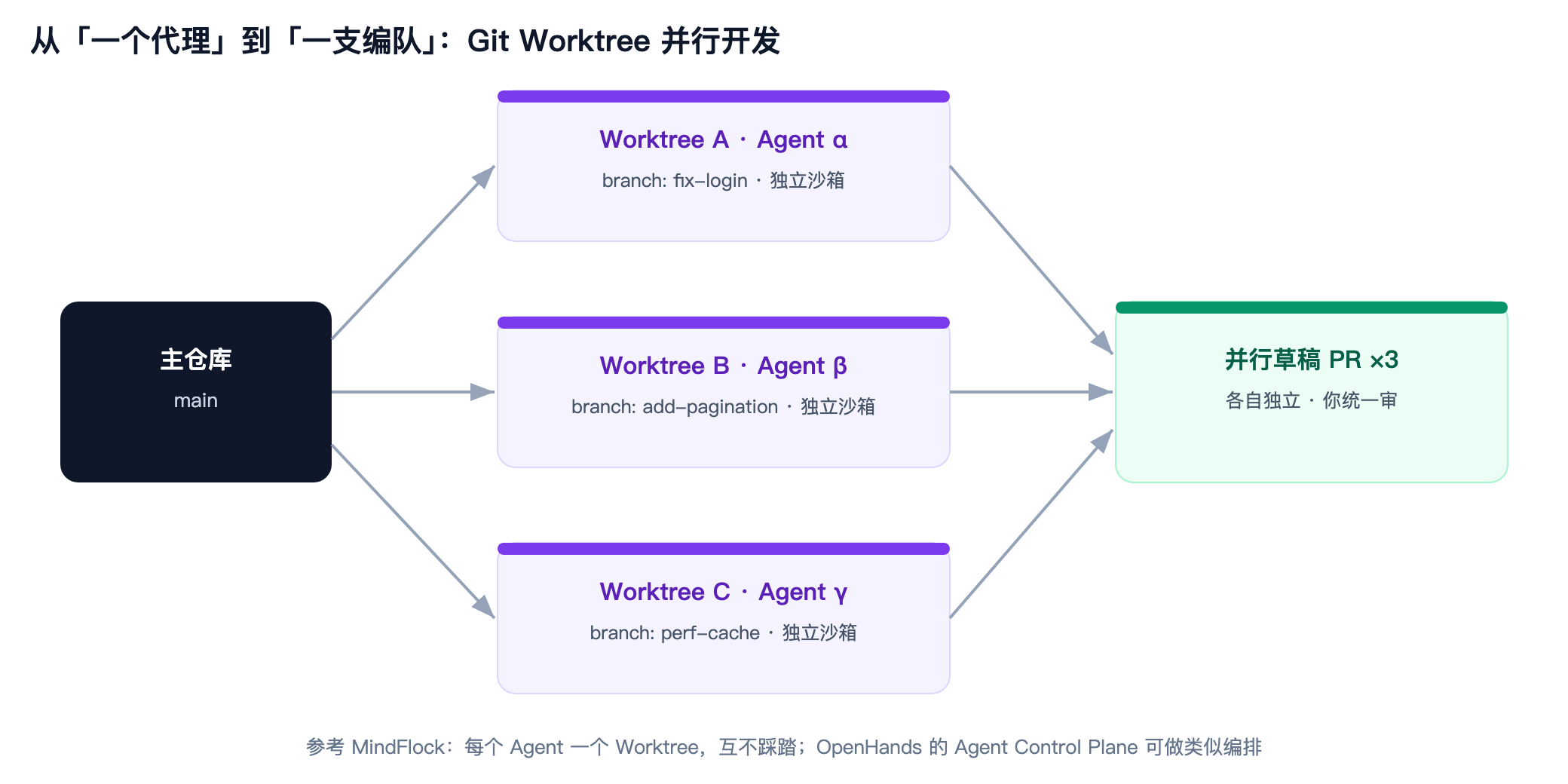
The traditional approach: one agent edits on the main branch, and the next one has to wait. With worktrees:
- agent α fixes login in
fix-login; - agent β adds pagination in
add-pagination; - agent γ does cache optimization in
perf-cache;
They share the same .git, but their working directories are isolated, so they don’t overwrite each other’s uncommitted changes. Each agent pushes a draft PR to its own branch when done, and the human merges them uniformly at the review end. You don’t need to actually hire three people to have three parallel “digital coworkers” working on the same codebase, each doing their own thing.
Part Five: two landing approaches I’ve practiced myself
Above is the thinking. Below are two landing approaches I’ve actually used.
Path A: GitHub Agent (least effort, zero infrastructure)
If you already use GitHub to manage projects, this is the simplest path. Today, most mainstream coding CLIs and GUIs can connect directly to GitHub.
Core flow:
- Create a GitHub Issue in the repo describing what to do;
- Assign the issue to
@the relevant agent, e.g. @codex(or in a PR comment); - Copilot starts inside a temporary GitHub Actions container, reads code, changes code, runs tests;
- It automatically opens a draft PR, with the title and description written for you;
- You comment on the PR “@relevant agent change this here,” and it loops;
- You review, CI passes, you merge yourself.
If it’s GitHub’s own Copilot, it’s even more convenient.
The one-time setup takes only two steps:
Step one, create a setup workflow so the agent’s environment is ready at startup:
# .github/workflows/copilot-setup-steps.yml
name: Copilot Setup Steps
on: workflow_dispatch
jobs:
  copilot-setup-steps:
    runs-on: ubuntu-latest
    steps:
      - uses: actions/checkout@v4
      - name: Install dependencies
        run: |
          npm install          # or pip install -r requirements.txt
          # put any env prep your project needs here
Step two, and the most important step: write AGENTS.md.
A good AGENTS.md looks like this:
# Project Overview
A backend management system based on Next.js 15 + TypeScript.

## Tech Stack
- Framework: Next.js 15 (App Router)
- Language: TypeScript 5.x
- DB: PostgreSQL (via Prisma)
- Testing: Vitest + Testing Library

## Build & Test
- Build: pnpm build
- Test: pnpm test
- Type check: pnpm typecheck

## Code Standards
- New features must come with unit tests
- API input validation uses Zod
- Naming and commit messages are in English

## Project Structure
- app/: Next.js route pages
- components/: shared UI components
- lib/: utility functions and DB operations
- tests/: test files
Key limits of the Coding Agent (also guardrails):
- One issue can only open one PR;
- Can only push branches, cannot touch main;
- The person who triggered the agent cannot approve that PR;
- By default runs CodeQL, secret scanning, dependency checks;
- Cannot merge itself.
Path B: OpenHands (open-source, self-hosted — you control the sandbox and the model)
Because I recently moved my code to my own server, I needed a tool to build a local flow. If you want a local sandbox, your own model, and your own logs, OpenHands is currently the most mature open-source option.
Fastest start (one command):
# spin up a Python 3.12 env with uv, no global pollution
uvx --python 3.12 --from openhands-ai openhands
If you use Docker:
WORKSPACE_BASE=$(pwd)/my-project

docker run -it \
  -e WORKSPACE_MOUNT_PATH=$WORKSPACE_BASE \
  -v $WORKSPACE_BASE:/opt/workspace_base \
  -v /var/run/docker.sock:/var/run/docker.sock \
  -p 3000:3000 \
  docker.all-hands.dev/all-hands-ai/openhands:main
Its advantages:
- Choose your own model: Claude, GPT, Gemini, local models all connect;
- Manage your own sandbox: Docker isolation, code never leaves your machine;
- Full agent loop: read issue, plan, write code, run commands, debug, open PR;
- CodeAct architecture: the agent executes code/commands directly, with a larger action space than fixed tool calls — but that also demands a truly isolated sandbox.
Part Six: guardrails and boundaries — fully automated is not unattended
This diagram is the one I most want you to remember.
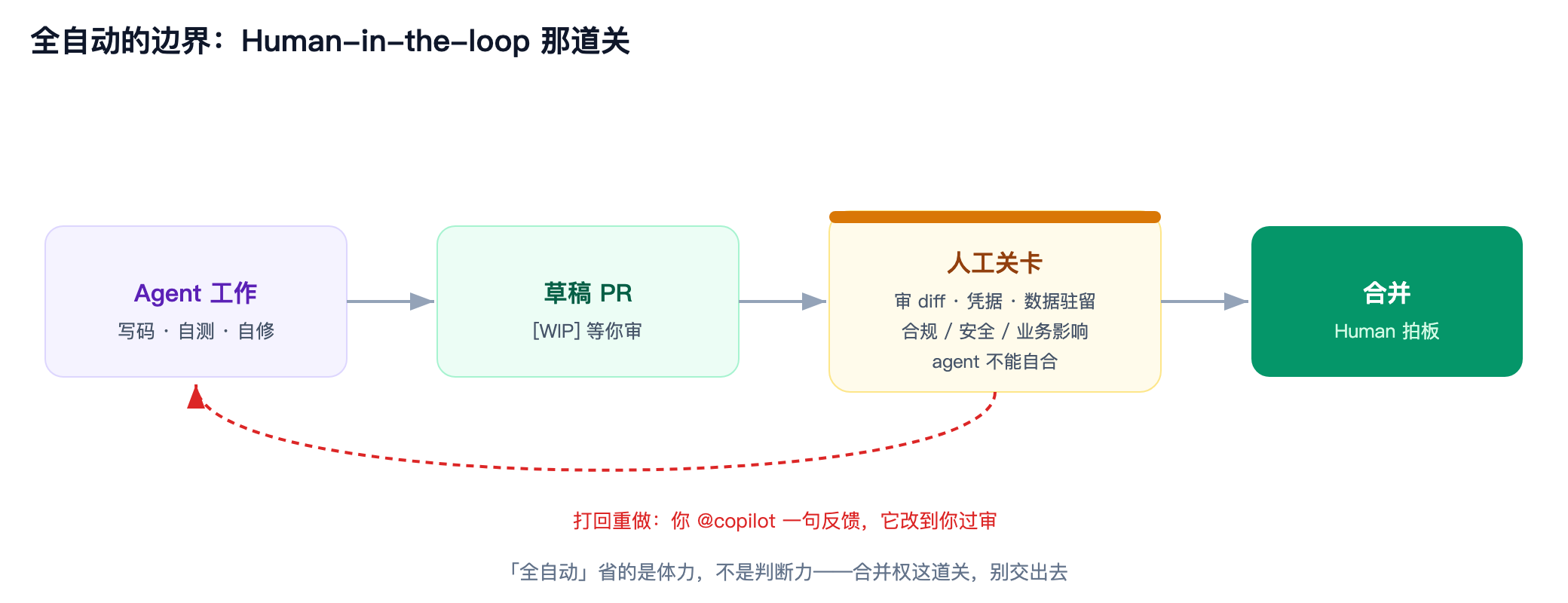
Agents are strong, but there are a few bottom lines you don’t hand over:
-
The merge right stays with the human
This is a common design across all trustworthy products. Don’t bypass this rule.
-
Vague tickets = the biggest risk source
If you only write “fix the login,” the agent will likely give you a PR that “looks right but doesn’t match the business.” The safest approach: the issue must include acceptance criteria, input/output examples, and possibly affected modules. You can reference the issue template I shared in an earlier post.
-
Don’t blindly trust credentials and dependencies
Agents read code, run commands, and install dependencies. If the repo has a malicious dependency, or the agent is tricked into leaking secrets, it’s even less resistant than a human. Proper repo permission settings better mitigate the risk.
-
Guardrails like OpenLore will matter more and more
Another open-source project on HN recently, OpenLore, did something: it gives agents deterministic, local-first memory and guardrails. Simply put, it makes the agent’s “memory” and “rules it cannot cross” local, auditable, and versionable. This is critical for long-running, multi-agent collaboration scenarios.
So my attitude is: let agents run the loop, but always keep the final audit gate. “Fully automated” saves physical effort, not judgment.