Managing Development Projects with Obsidian
💡 This article explores how to manage Releases, Features, and Bugs in Obsidian, structure them, and sync them to GitHub Issues — enabling multi-project development with AI collaboration.
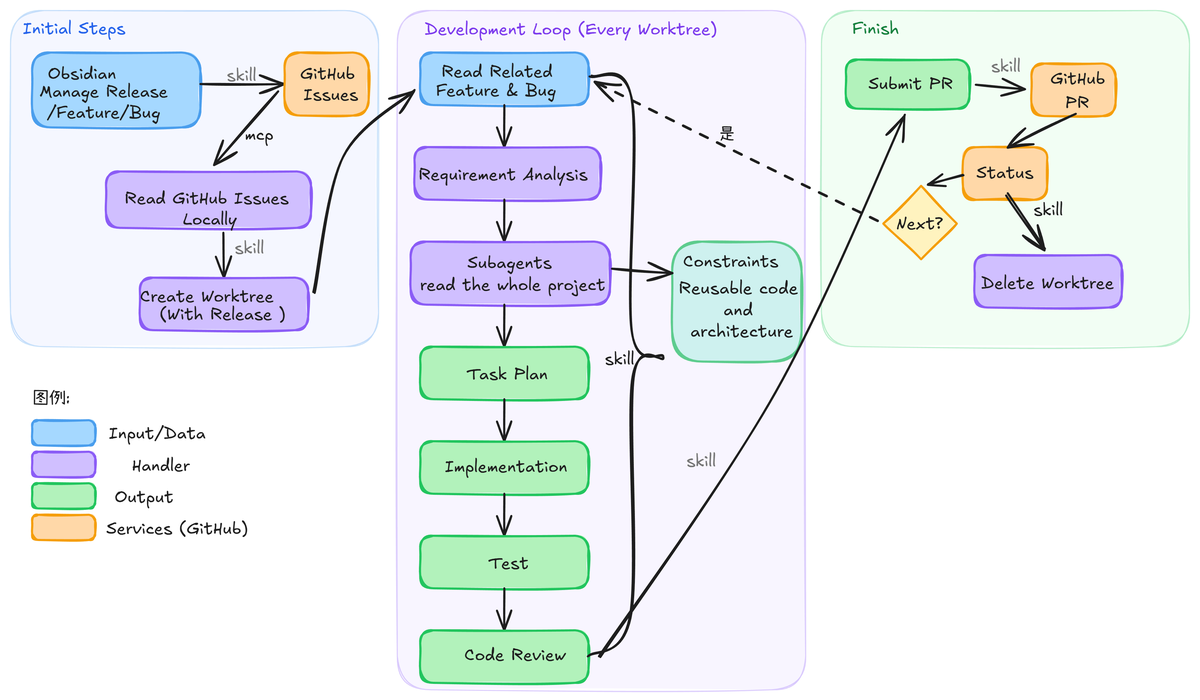
My current development workflow is shown in the diagram above (this image was auto-generated by AI + Excalidraw MCP, with minor formatting adjustments made by me). This workflow is entirely designed around my personal working habits.
Based on this workflow, I can simultaneously synchronize multiple worktrees for development, with each worktree corresponding to a different release. This is also why I mentioned in a previous article that a good terminal is essential — I need to clearly see what each tab is working on, and be able to quickly switch between different versions to check progress.
I prefer to manage both personal plans and project development within Obsidian, while also leveraging AI for retrospectives. This article focuses on the first part: how to centrally manage Releases, Features, and Bugs in Obsidian, structure them, and submit them to GitHub Issues, with support for multiple projects.
Multi-Project Support
I maintain multiple projects simultaneously, so I created a Projects folder in Obsidian to manage all of them.
Each project is a standalone folder containing a complete knowledge base: from ideas to architecture design, from technology selection to the evolution logic of each version. I want all thinking related to a project to be documented locally.
In every template, I maintain corresponding repository and branch information, for example:
name: my_project
github_url: https://github.com/xxx/my_project
default_branch: main
Three Object Templates
I maintain templates for these three objects: Bug represents technical issues, emphasizing reproduction paths and environment information; Feature represents functional design, emphasizing goals and constraints; Release is an aggregation, defining the scope and objectives of a phase. They form a structured relationship through bidirectional links.
Bug Template
Metadata is designed as follows:
type: bug
id: 20260402110537
title:
created: 2026-04-02 11:05
updated: 2026-04-02 11:05
status: Backlog
priority: P2
severity: medium # low | medium | high | critical
release:
components: []
github_issue:
github_url:
default_branch:
tags: [bug]
• type is used for type identification • id serves as a unique identifier to avoid naming conflicts • status typically defaults to Backlog, while other states are managed and updated in the issue • priority and severity represent business priority and technical severity respectively • release is used to bind to a version • components marks the involved modules to control the scope of AI modifications • github_issue is the issue number filled back after creation • github_url && default_branch are used to control the project • tags are for statistics and management within Obsidian
The main body content covers five aspects:
• Description: A brief description of the problem • Steps to Reproduce: Steps and methods to reproduce the issue • Expected Behavior: What the expected normal result and behavior should be • Environment: Which environment the issue occurs in (development, testing, production) • Logs: Error log information
Feature Template
Metadata is designed as follows:
type: feature
id: 20260402110537
title:
created: 2026-04-02 11:05
updated: 2026-04-02 11:05
status: Backlog
priority: P2
severity: medium # low | medium | high | critical
release:
components: []
github_issue:
github_url:
default_branch:
tags: [feature]
related_bug:
This is basically the same as the Bug design, with the only addition being related_bug. Some features evolve from bugs (e.g., adding validation or boundary conditions), so it’s necessary to track which bug they are associated with.
The main body content covers six aspects:
• Summary: A summary of what this feature needs to do • Description: A detailed description of the feature’s context, including potential changes involved, reasons, etc. • Proposed Solution: Implementation path description, including parts and functionality that may need modification • Constraints: Constraints specific to the feature, such as concurrency scenarios, data access constraints, compatibility, fallback mechanisms, etc. • Test: What testing content needs to be added • Example: I typically write this section following the logic of test cases
Release Template
Metadata is designed as follows:
type: release
version: v0.3.0
created: 2026-04-02 11:05
updated: 2026-04-02 11:05
status: Backlog
github_release:
github_url:
default_branch:
The Release template is mainly used to manage versions, phase objectives, and collections of features and bugs. It connects the features and bugs that need to be completed in a release through bidirectional links.
The main body content covers five parts:
• Goal: Define what this release truly aims to solve. My personal habit is to categorize a certain module or type of issues into a release version. This allows better control over AI’s modification scope — for example, this release only modifies frontend issues, or only modifies the login module’s issues and functionality. • Scope: Define modification boundaries. This is the benefit of categorization — it gives AI a clearer division of its modification scope. • Included Features && Fixed Bugs: Linked via double brackets to the defined bugs or features • Test Plan: This needs to consider overall regression testing, which must pass before submitting a PR • Release Notes: This is left as a memo for myself
Design Philosophy
I still want to maintain overall control of my entire project, so every time I write this content, it actually requires me to retrospect on the project’s changes, understand the implementation logic and methods of each part of the code, so that I can better standardize the way changes are made.
In the era of AI collaboration, developers increasingly serve as task orchestrators. How to reasonably split and plan tasks for each version is an important topic. Through local notes, I can record my overall thinking process, and later use AI to review the planning of the entire process, so I can think about more optimized orchestration ideas. Obsidian also supports many plugins, making it easy to aggregate and visualize this content.
It’s also possible to develop by directly reading local Obsidian notes, but since I’m using Codex’s code review feature, I still need to go through the GitHub workflow. Therefore, the issue template needs to be consistent with the note template format, and when submitting a PR, Codex will write the review content into the issue.
Of course, this is just my own development workflow, for reference only. It simply provides a line of thinking. As I mentioned in a previous article, you should think about how to encapsulate your own workflow and integrate it better with AI.
Automation is not the key to the entire workflow — it’s the cognitive approach. Cognition always precedes tools.