How I Achieved Parallel Multi-Task Development with Git Worktree + Skills
💡 This article shares how to use Git Worktree combined with Skills to achieve parallel multi-task development, transforming from “writing code” to “designing execution structures” in the AI era.
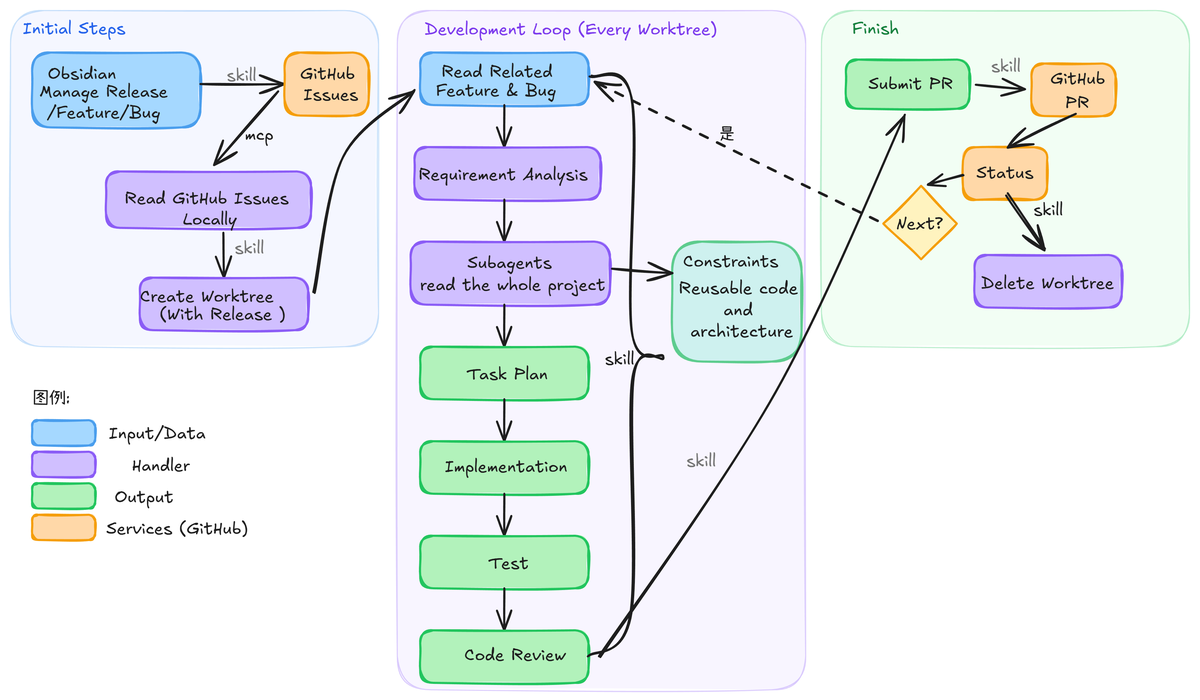
In a previous article, I introduced how I manage releases, features, and bugs in Obsidian to structure development tasks. Once tasks are organized, another more important matter is how these tasks can be executed in parallel efficiently. If we still follow the traditional development approach — one branch per feature, progressing linearly — then even with AI assistance, we’re essentially still doing single-threaded development. Once tasks multiply, people need to constantly switch between different contexts, and efficiency actually decreases.
So now I treat release as a higher-level execution unit and introduce multiple worktrees for parallel development.
Using Release to Define Parallel Units
In this structure, each release corresponds to an independent worktree. This worktree contains all features and bugs for that version. It’s no longer a feature branch but a complete development context.
This means the granularity of parallelism shifts from a single feature to a business objective. The division of releases must be convergent. Otherwise, parallelism will lead to chaotic code.
I personally prefer to divide releases by business objectives — that is, a group of changes that collectively serve the same goal.
But this isn’t the only way. You can also organize by module, code path, or even change type. The key isn’t what dimension you use, but whether you’ve controlled the scope of changes. Only when each worktree’s boundaries are clear enough is parallelism controllable.
Even with division, conflicts are inevitable when multiple worktrees are developed in parallel. However, in the design, I deliberately do a few things to reduce merge complexity: clear module division to reduce cross-modifications, limiting the scope of changes during the release phase, and controlling modification boundaries through constraints during execution.
Each Worktree Is an Automated Development Unit
If we only stop at the worktree level, we’ve only solved the “can be parallel” problem. In my system, each worktree is essentially an independent automated development unit.
This unit starts from a GitHub Issue, reads all features and bugs under a release, and then strings together a complete development workflow through a set of skills: requirements analysis, code scanning, implementation planning (including specific testing), coding, automated testing, code review, and finally completing the commit and updating the status. The entire process is encapsulated into a skill. Each time this skill is triggered, it can read the issue and initiate the entire development workflow from worktree creation to completion. Of course, I still recommend having a person do the final testing. Throughout the process, some token-expensive steps can be done with cheaper models — for example, code scanning can use a cheaper model running multiple sub-agents (just write the invocation method directly into the skill).
Process-Driven
During execution, each stage produces structured information to support the next step’s decisions. This information doesn’t scatter across the project but is concentrated in a temporary file — I typically use an info folder. Throughout the process skill, it continuously references the contents of this folder and periodically outputs analysis and summaries.
This has two benefits:
• Every step has clear inputs and outputs, making the process more stable • This intermediate information can be understood and reused by agents, rather than starting reasoning from scratch at every step
Ultimately, after the entire process is complete, only the necessary results are crystallized into formal documents or code, while the rest of the intermediate information doesn’t pollute the project itself.
Finally, if there are any issues during the entire process, you can first have AI resolve the existing workflow problems and then call the Skill Evolution Manager skill. This skill can capture the improvements from your previous conversations with AI and use them to refine the workflow skill.
From “Writing Code” to “Designing Execution Structures”
Looking back, the shift in this approach isn’t about which tools are used, but rather that the focus of development has changed. In the past, the focus was on writing code. Now, it’s more about how to design processes, define constraints, and organize execution paths. Once these are structured, agents can participate stably, rather than remaining at the “assist with coding” level.
This approach isn’t a standard process that must be copied, but rather an organizational method I’ve gradually summarized from actual use that suits my own development workflow. The specific tools and implementation details can all be replaced, but the core principle remains the same: break the development process into units that can be executed, constrained, and combined.
Against the backdrop of AI gradually entering the development workflow, this capability may become increasingly important.